

Guided Walkthroughs
How to Obtain Tokens ⭐
This recipe was an interactive walkthrough in the previous portal. Each step below names the API call it makes; open it in the API Reference to try it.
Get Access Token
Introduction
This guided walkthrough showcases how to get access token and session token to use Verizon APIs.
Getting Started
In order to use Verizon APIs, you need to obtain a ThingSpace Token programmatically.
Steps to generate ThingSpace Token programmatically
- Sign in to thingspace.verizon.com.
- Click on your login icon (in the upper right corner) and from the drop-down select "Key Management". Below is the direct links to the Key Management page:
- ThingSpace Developer Portal Users click here
- Copy the Client ID and the Client Secret and store them for use.
- Go to the step 2,
Get Session Token.
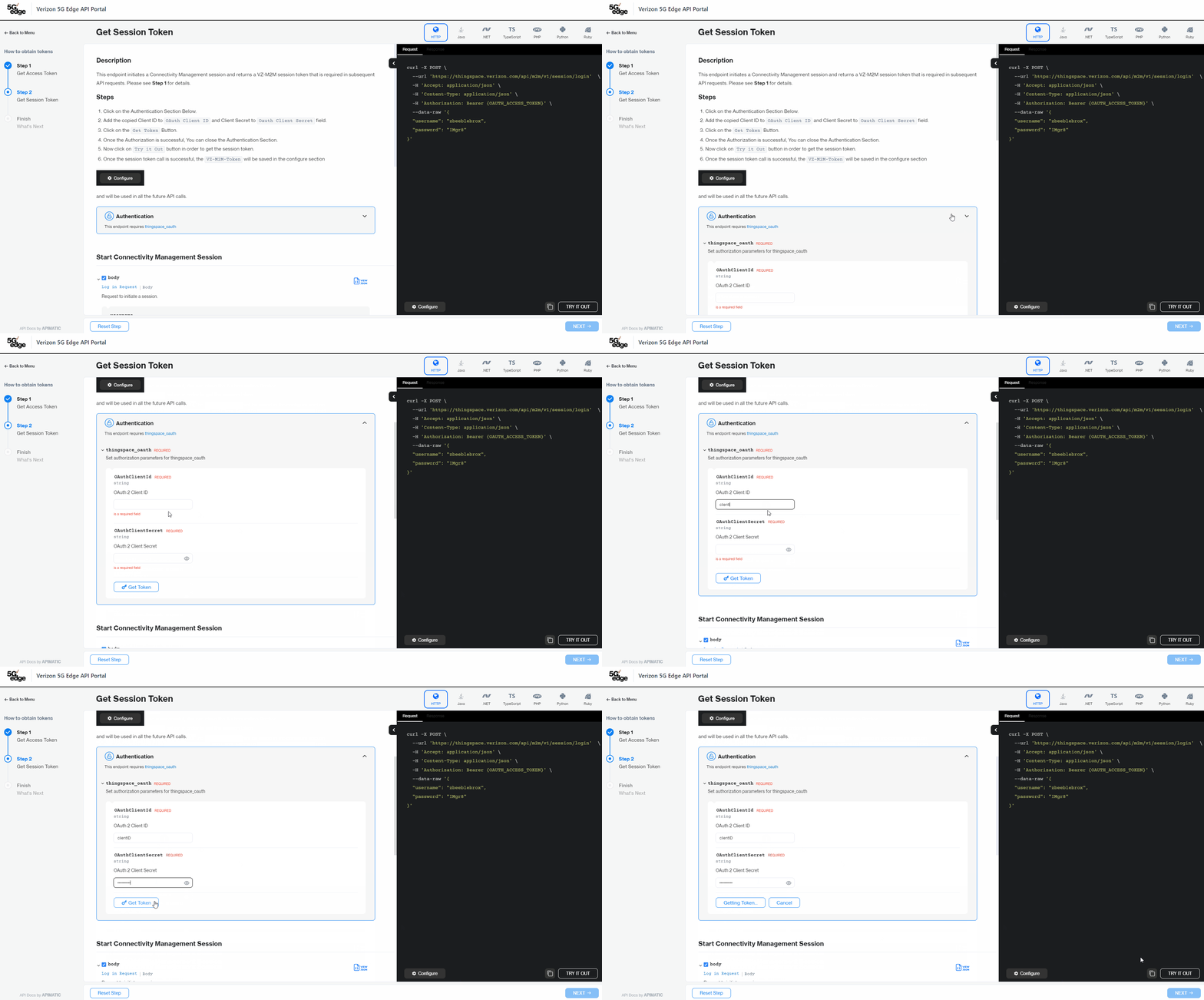
Step 1: Get Session Token
Have a look at some other Guided Walkthroughs
Here are some popular use cases
| Title | Description | Action |
|---|---|---|
| How to Activate a Device | This guided walkthrough showcases how to use Verizon API to activate a device. | Try Now |
| How to Get Device Location | This guided walkthrough showcases how to use Verizon API to Get Device Location. | Try Now |
| How to Get Device Usage | This guided walkthrough showcases how to use Verizon API to get device usage. | Try Now |
| How to Fetch Device Information | This guided walkthrough showcases how to use Verizon API to fetch the Device Information List. | Try Now |
| How to Fetch Device Usage History | This guided walkthrough showcases how to use Verizon API to fetch the Device Information List. | Try Now |
| How to do 4G/5G Address Validation | This guided walkthrough showcases how to use Verizon API for 4G/5G Address validation. | Try Now |
| How to Activate Service For a Device | This guided walkthrough showcases how to use Verizon API to activate a device. | Try Now |
| How to Register for DiagnosticService Callback Service | This guided walkthrough showcases how to use Verizon API to register a callback listener URL. | Try Now |
| How to do SIM Secure Assignment | This guided walkthrough showcases how to use Verizon API to assign SIM Secure for IoT Licenses. | Try Now |
| How to do Site Proximity | This guided walkthrough showcases how to use Verizon API for Site Proximity. | Try Now |
| How to determine Network Conditions | This guided walkthrough showcases how to use Verizon API to determine near real-time network conditions. | Try Now |
| How to Get RF Strength Baseline | This guided walkthrough showcases how to use Verizon API to Get RF strength baseline. | Try Now |
| How to Register For Outages | This guided walkthrough showcases how to use Verizon API to register for outages. | Try Now |
| How to Verify Network Location | This guided walkthrough showcases how to use Verizon API to verify network location. | Try Now |
| How to Get Experience Score | This guided walkthrough showcases how to use Verizon API to get experience score. | Try Now |
| How to do Fota Upgrade | This guided walkthrough showcases how to use Verizon API to schedule a firmware upgrade for devices. | Try Now |
Description
This endpoint initiates a Connectivity Management session and returns a VZ-M2M session token that is required in subsequent API requests. Please see Step 1 for details.
Steps
- Click on the Authentication Section Below.
- Add the copied Client ID to \
API call: StartConnectivityManagementSession