

Premium APIsSoftware ManagementGuidesGetting Started
Campaign Lifecycle Flow for v2
Campaign Lifecycle Flow for HTTP Devices using the /v2 Resource Path
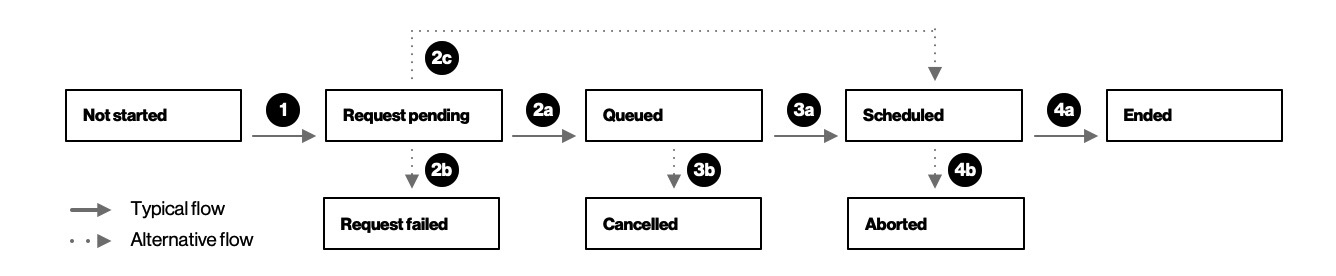
- Creating a campaign starts with the user scheduling which devices with proper make, model and current software prerequisites need to be updated with which software at what date.
- Once the user schedules a campaign request, the campaign changes to “Request Pending” status
- After passing parameter checks, campaign status typically moves to "Queued" status.
- If parameter checks fail, it moves to "RequestFailed" and may bypass "Pending."
Checks could include eligibility such as licenses, FOTA capable, prerequisistes or timing checks. - If it is an on-demand campaign, it bypasses the "Queued" status and moves to "Scheduled."
- The campaign normally stays in "Queued" status while the system collects requests.
- Once the start date has begun, it moves to "Scheduled."
- The user can choose to cancel the campaign in "Queued" status.
- The campaign stays in "In Progress" during the device update.
- Once the campaign end date has been reached or if all devices were successfully upgraded, it moves to “ended.” For an on-demand campaign, the end date is one week after the start date.
- After the campaign begins but before it ends, the user could decide to “abort” the campaign. Some devices may have already been upgraded.
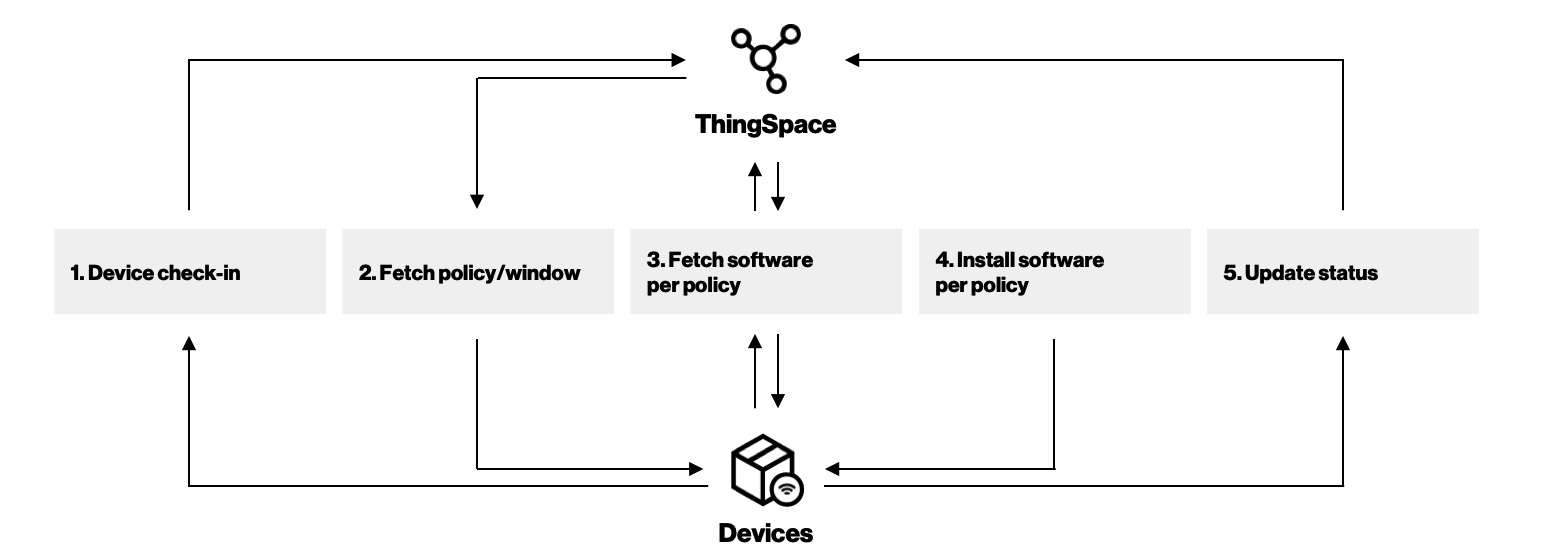
Device Lifecycle Flow for HTTP Devices using the /v2 Resource Path
Status and Error Messages for HTTP Devices using the /v2 Resource Path
| Device Status | Device Detail Status |
|---|---|
| Accepted | Device cleared all checks so it can be added to the scheduled list. |
| DeviceRejected | Device not found. |
| DeviceRejected | Device scheduled for firmware upgrade previously, needs to be completed before another upgrade is scheduled. |
| DeviceRejected | Device not eligible for service (not FOTA capable) |
| DeviceRejected | Invalid device IMEI. |
| DeviceRejected | Current device software version does not meet software prerequisites. |
| DeviceRejected | Device make/model does not meet software prerequisites. |
| DeviceRejected | Device is not in active state or is not connected. |
| DeviceRejected | Internal Error. |
| UpgradedFailed for UpgradePending | RovaClientDidNotReportStatus |
| UpgradedFailed for UpgradePending | RovaClientDownloadFailed |
| UpgradedFailed for UpgradePending | RovaClientDownloadNotInstalledYet |
| UpgradedFailed for UpgradePending | RovaClientDownloadedInstallFailed |
| UpgradedFailed for UpgradePending | Uknown device error. |
| UpgradedFailed for UpgradePending | Other. |
| CampaignCancelled | Campaign canceled by user. |
| UpgradeSuccess | Download and install succeeded. |
| CampaignAborted | Campaign aborted by user. |